IGA A Winner Every 10 Minutes – Frequently Asked Questions
How long does the promotion go for?
The “IGA Gift Card – A Winner Every 10 Minutes Promotion” promotional period is running from Wednesday 8th April 2026 7:00 am AEDT to Tuesday 5th May 2026 11:59 pm AEDT.
Are all IGA stores participating?
The promotion is not available in Tasmanian stores or Foodland IGA.
Any IGA, IGA Local Grocer, Supa Valu (Doonside, Ballina & Delahey, Girrawheen) stores within Australia which display advertising for this Promotion or online at https://www.igashop.com.au/
How to enter?
To enter the Promotion, the entrant must complete the following steps during the Promotional Period:
- spend $20 or more in a single transaction on any product (excluding liquor, tobacco, tobacco related products, lotto products, gift cards, stamps or prescription) (“Qualifying Spend”) from any IGA, IGA Express, IGA Local Grocer or SUPA VALU store displaying advertising for this Promotion or online at https://www.igashop.com.au/ (“Participating Venues”); and
- between 7:00 am AEST and 12:00 am AEST, visit iga.com.au/win, follow the prompts to the Promotion entry page; and fully complete and submit the online entry form with their personal details (first name, last name, email address, mobile number and State/Territory of residence), store of purchase, (optional) select the tick box to agree to receive marketing from the Promoter, upload a scanned copy or photo of the receipt for the qualifying transaction to reveal whether or not they have won an instant prize and (for a Bonus Entry) enter the unique code found on the game card or eDM as prompted*.
The winners will be notified on screen upon entry form submission, subject to verification.
*Bonus Entry: If the Qualifying Spend includes any of the Participating Brands listed below, the entrant will receive one (1) Bonus Game Card, either a physical card for in-store purchases or a unique code via eDM for online purchases. Only one Bonus Game Card is allowed per transaction, regardless of how many Participating Brands are bought in that transaction. The unique code will trigger another chance at winning an instant prize.
Participating Brands: Arnott’s, Pepsi, Coca-Cola, Golden Circle, Moccona, Mars Confectionary, V Energy, Smiths, Continental, Rexona, Dove, Nivea, OMO, Dairy Farmers and Farmers Union.
Proof of Purchase: The entrant must retain proof of purchase. The proof of purchase required is an original receipt for the qualifying transaction.
Do I need to keep my receipt?
Yes, Entrants must retain their original purchase receipt. Entrants who win an Instant Win Prize will be asked to provide a picture of their receipt for the Promoter to validate their win.
Important note: all entrants must retain their original purchase receipt or online invoice for all entries as proof of purchase. Failure to produce the proof of purchase for all entries when requested may, in the absolute discretion of the Promoter, result in invalidation of ALL of an entrant’s entries and forfeiture of any right to a prize. Purchase receipt(s) or invoice(s) must clearly specify the store of purchase (for instore purchases), participating product/s and the date of purchase on the receipt(s) or invoice(s)/online order confirmation must be during the Promotional Period and prior to entry.
When taking a photo of my receipt what do I need to include? Should I take the photo vertically/portrait or horizontally/landscape.
When taking a photo of your receipt, please ensure that you capture the whole receipt in one image, using the vertical/portrait format (see example below). Make sure the printed receipt is legible clearly displaying the following information to validate your entry.
Participating store of purchase (for in-store purchases),
Date of purchase on the receipt(s) or invoice(s)/online order confirmation which must be during the Promotional Period and Total amount spent.
Depending on the store purchased the information could be displayed in various places on the printed receipt. Please look for the following on your receipt.

How do I upload my printed in store receipt?
We recommend using a smartphone or tablet device to take a photo of your paper receipt, which you can then select and upload the image directly from your photo album.
Alternatively, you can take a picture of the paper receipt using your camera or scan the document using a scanner. This method will require you to save the image to your computer/smartphone to upload.
Uploading a file from your computer
- Click on the ‘Upload Receipt’ button shown on the winner page
- Then locate and select the file on your computer.
- Select the file and click ‘Open’ to confirm your selection.
- Your proof of purchase is now uploaded to your claim form.
- Review the receipt is legible and Enter “SUBMIT”
If you are still not able to upload your receipt, please contact IGA Customer Care for further assistance.
Uploading a file from your smartphone
- Take a photo
- Click on the “Take a photo” button shown on the winner page
- The camera of your phone will open
- If you are an iPhone user the click the picture, click on the “use photo” icon if the picture is correct or if your picture is incorrect then click on the “retake” icon to take the picture of your receipt again. If you are an android user then click the picture, click on the “checkmark” icon if the picture is correct or if your picture is incorrect then click on the “redo” icon to take the picture of your receipt again
- After clicking on the “checkmark”/ “use photo” icon, your receipt will be uploaded
- Your proof of purchase is now uploaded to your claim form.
- Review the receipt is legible and Enter “NEXT”
- Upload Receipt
- Click on the ‘Upload Receipt’ button shown on the winner page
- Then locate and select the file on your smartphone.
- Select the file to confirm your selection.
- Your proof of purchase is now uploaded to your claim form.
- Review the receipt is legible and Enter “NEXT”
If you are still not able to upload your receipt, please contact IGA Customer Care for further assistance.
How do I upload my shop online receipt?
Customers who shop online will receive a pdf of their order confirmation/invoice via email.
- You will need to save the pdf of your order confirmation/invoice sent via email onto your phone/computer.
- Uploading a pdf file from your computer/phone
- Click on the ‘Upload Receipt’ button shown on the winner page
- Then click ‘Browse’ and locate the saved image on your smart phone/computer.
- Select the file and click ‘Open’ to confirm your selection.
- Your proof of purchase is now uploaded to your claim form.
- You will see either a PDF symbol OR the first page only of your invoice.
- Enter “NEXT”
Why am I not able to upload the receipt?
In case of not being able to upload the receipt, refresh the page and try again.
Is there a limit to how many times I can win?
Multiple entries permitted subject to the following:
- a) maximum of one (1) initial entry and one (1) bonus entry permitted per transaction;
- b) subject to any Bonus Entry awarded, a maximum of one (1) entry is permitted per person per day; only one (1) unique code per entry is permitted;
- c) the same unique code cannot be used more than once;
- d) unrecognised codes will be deemed invalid; and
- e) each entry must be completed separately and in accordance with the entry instructions above.
I’ve won a gift card – How do I redeem it?
The prize is an IGA e- Gift Card.
The gift card will be sent to the email provided when claiming the instant win prize and should arrive within 3 business days from the day of being verified.
The gift card is subject to the Metcash physical Gift card terms and conditions as outlined here: https://metcashgiftcards.com.au/terms-conditions/ and may only be used to purchase goods and services in-store at Participating IGA, IGA Local Grocer or Supa Valu (Doonside, Ballina, Girawheen & Delahey).
Is there a time limit to redeem my instant win?
All reasonable attempts will be made to contact each winner. Prizes must be claimed by 1:00 pm AEST on 08/06/26.
How do I enter the Unclaimed Prize draw?
In the event of any unclaimed prizes, an unclaimed prize draw will take place at Creata, Unit 6, 3 Central Avenue, Thornleigh NSW 2120, Australia at 2:00 pm AEST on 12/06/26. The provisional winner(s) of the unclaimed prize draw will be contacted via email within seven (7) days and Prizes 1-3 winners will be published at www.iga.com.au/win by 15/06/26. The draw conductor may select additional reserve entries in case an invalid entry or entrant is drawn.
If there are no prize winner(s) or winner(s) for this Promotion cannot be found, this information will be published at www.iga.com.au/win.
What should I do if my mobile verification code is invalid?
Click on the resend option to get a new verification code. You will receive a new verification code to your registered mobile number with us.
What is the validity period of a mobile verification code each time?
Remember, each mobile verification code is valid for 10 minutes from the time it’s sent. If the code is not used within this period, it will expire, and you will need to request a new one.
How many times I can request for resend of mobile verification code?
The customer can request to resend the mobile verification code five times. After 60 seconds have passed, the option to “Resend Verification Code” will become available. In the event of exhausting this limit, for further assistance, please contact us at [email protected]
What should I do if I have submitted wrong mobile number?
Contact [email protected]
What should I do if I lose access to Bonus Entry Page?
The customer should contact [email protected] and the team will provide guidance to access the page again.
Where can I find my Unique Redemption Code for Bonus Entry?
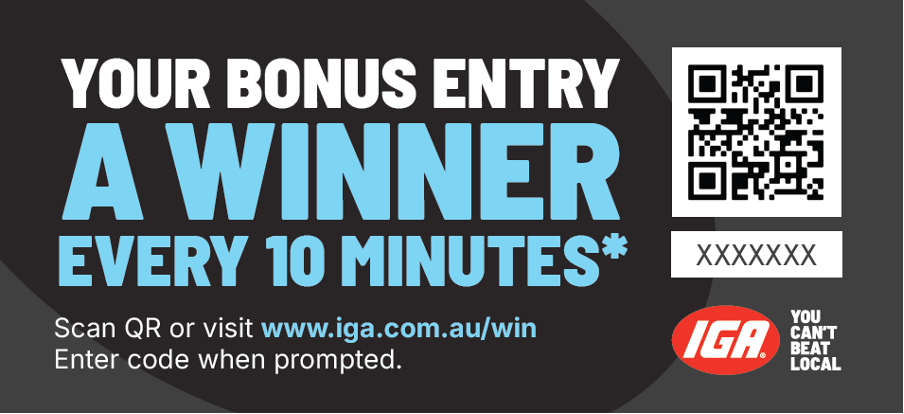
Individuals who either (i) purchase a product from a participating brand (as listed above) within their Qualifying Spend in store; or (2) complete their Qualifying Spend online, will be given a Game card that will contain a QR Code and a unique redemption code, subject to availability and while stocks of game cards last.
Where will I receive my game card if I have made a qualifying spend online?
For clarity, entrants that make a Qualifying Spend online will not receive a physical game card but will be sent a unique redemption code via email.